3 Ways to Generate Leads with PinLeads
 Jared
Jared
Table of Contents
- Method 1: Direct Search
- Method 2: Single Search URL
- Method 3: Multiple URLs (Spreadsheet)
- Which Method Should You Use?
- Advanced Extraction Options
PinLeads gives you three different ways to extract leads, each designed for specific use cases. Whether you need quick results, targeted searches, or bulk processing, there's a method that fits your workflow.
Let's break down each approach so you can choose the right one for your lead generation goals.
Method 1: Direct Search
Direct Search is the fastest and simplest way to generate leads on PinLeads. You search for leads directly within the app without needing to leave or copy URLs from external sources.
This method is perfect when you know exactly what you're looking for and want immediate results. Just type your search query into PinLeads, and the system handles the rest: extracting 100+ leads per hour automatically.
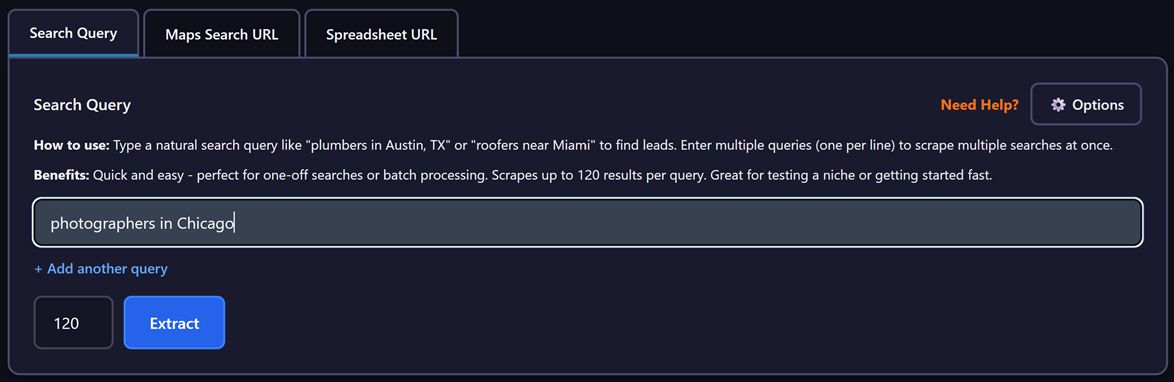
The workflow couldn't be simpler: enter your search terms, start the extraction, and watch as PinLeads pulls business listings from Google Maps. You'll see real-time progress as each lead is captured, complete with business names, addresses, phone numbers, websites, and contact information.
Why Direct Search works well:
- Fastest method - No setup or preparation required
- No setup required - Just type and go
- 100+ leads per hour - High-volume extraction capability
Direct Search is ideal for quick prospecting sessions when you need leads fast. For example, if you're a web designer targeting plumbers in Phoenix, you can simply search "plumbers in Phoenix" and have a comprehensive lead list within minutes.
Method 2: Single Search URL
The Single Search URL method gives you more control by letting you paste a specific Google Maps search URL into PinLeads. This approach is particularly useful when you've already crafted the perfect search on Google Maps and want to extract those exact results.
Instead of recreating your search within PinLeads, you can work directly with the URL you've already refined. This method extracts business listings from the first 120 results of your Google Maps search, making it ideal for targeted lead generation where precision matters more than volume.
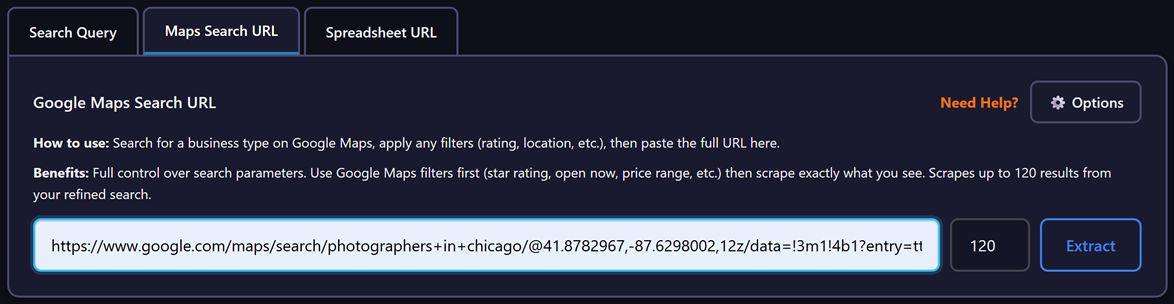
Here's how it works: navigate to Google Maps, run your search with all your filters applied, copy the URL from your browser, and paste it into PinLeads. The system will extract all visible listings from that search page, giving you exactly the businesses you identified.
Key advantages of Single Search URL:
- Quick setup - Copy and paste your existing search URL
- Up to 120 listings per search - Focused extraction from a single query
- Single-run extraction - Perfect for one-time targeted searches
This method shines when you've already done the research on Google Maps and found a search that surfaces exactly the type of businesses you want to target. It's also great for testing different search strategies before committing to bulk extraction.
Method 3: Multiple URLs (Spreadsheet)
For power users who need to process large volumes of leads, the Multiple URLs method is the most powerful option. This approach lets you upload a spreadsheet containing multiple Google Maps search URLs, which PinLeads then processes in sequence, automatically extracting results from each search.
This is bulk lead generation at scale. Instead of running searches one at a time, you can queue up dozens or even hundreds of searches and let PinLeads handle the entire workflow. The system processes each URL sequentially, extracts all available listings, and combines everything into a single CSV export for easy use.
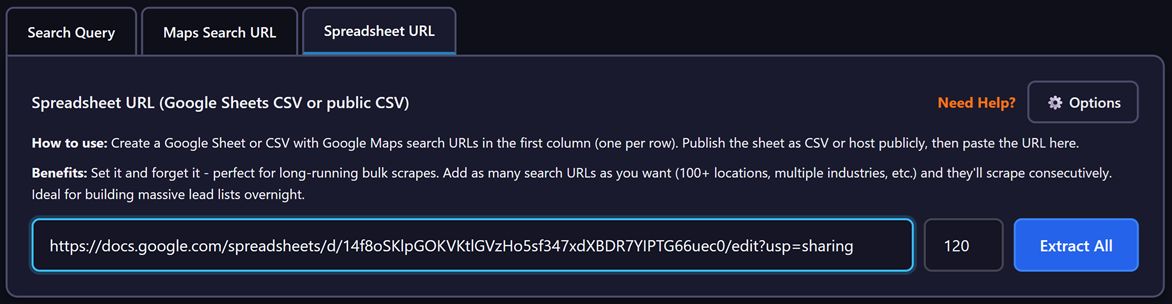
The process is straightforward: create a spreadsheet with your Google Maps search URLs (one per row or column), upload it to PinLeads, and start the extraction. The system will work through each URL automatically, visiting each search page, extracting all business listings, and compiling the results into one comprehensive file.
Why Multiple URLs is powerful:
- Run multiple searches - Process dozens of searches in one session
- Batch processing - Automated sequential extraction
- Combined CSV export - All results in one organized file
This method is perfect for agencies and sales teams who need to build massive lead lists across different geographic areas, industries, or search variations. For example, a marketing agency targeting restaurants across 10 different cities could upload 50 different search URLs and extract thousands of leads in a single session.
Which Method Should You Use?
Each method serves a specific purpose, and the right choice depends on your lead generation goals:
Choose Direct Search when:
- You need leads quickly and don't want to navigate Google Maps
- You're doing ad-hoc prospecting and testing different markets
- You prefer the simplest, fastest workflow
- You're new to PinLeads and want to get started immediately
Choose Single Search URL when:
- You've already found a great search on Google Maps
- You want precise control over which results get extracted
- You're testing specific search strategies before scaling
- You need targeted results from a single, well-crafted query
Choose Multiple URLs when:
- You need to generate hundreds or thousands of leads at once
- You have a list of specific searches you want to process
- You're running large-scale campaigns across multiple markets
- You want to automate your lead generation workflow
Advanced Extraction Options
Regardless of which method you choose, PinLeads offers advanced extraction options to fine-tune your lead generation. These settings help you control exactly what data gets collected and how the extraction process works.
Data Types - Choose which information to extract: email addresses, LinkedIn profiles, phone numbers, or any combination. This lets you focus on the contact methods that matter most for your outreach strategy.
Require Fields - Set requirements so PinLeads only returns results with specific data present. For example, you can specify that you only want businesses with email addresses, filtering out those without.
Filter Generic Emails - Automatically exclude generic email addresses like info@, support@, and noreply@. This helps you focus on decision-makers rather than general inboxes.
Custom Domain Filters - Block up to 10 specific domains (available on Business plan). Use this to exclude competitors or companies you don't want to target.
Time Limits - Set automatic stop timers from 30 minutes to 8 hours. This helps you manage your workflow and prevent extraction from running longer than intended.
These advanced options work with all three extraction methods, giving you granular control over your lead generation regardless of which approach you choose.
Getting Started
Ready to generate leads with PinLeads? Here's how to get started:
- Sign up for a PinLeads account
- Choose your method based on your needs (Direct Search for speed, Single URL for precision, Multiple URLs for volume)
- Configure your extraction options to match your outreach strategy
- Run your extraction and watch as leads populate in real-time
- Export to CSV and import into your CRM or outreach platform
The businesses you need are out there on Google Maps, verified, active, and waiting to hear from you. PinLeads gives you three different ways to find them, depending on how you like to work.
Free Tools to Help You
Cold Email Subject Line Generator
Generate personalized, high-converting subject lines with predicted open rates.
Try Tool →Email Deliverability Checker
Analyze your emails for spam triggers and get deliverability scores.
Try Tool →Lead List ROI Calculator
Calculate the ROI of your lead generation campaigns with visual reports.
Try Tool →Related Articles
How to Find Roofing Leads Using Google Maps in 2026 (Complete Guide)
Discover how to find high-quality roofing contractor leads using directory extraction. Step-by-step tutorial with templates, CSV examples, and proven outreach strategies for B2B sales.

How Web Designers Find Local Business Clients with Directory Extraction
Learn the exact workflow successful web designers use to find local businesses with outdated websites, extract contact info, and pitch redesign services that convert.

How to Extract Leads from Google Maps Without Coding (2026 Tutorial)
Complete no-code guide to extracting leads from Google Maps. Extract names, phones, emails, and websites without writing Python code.
Directory Extractor with CSV Export: Complete Integration Guide
Learn why CSV export is critical for directory extractors and how to integrate scraped local business data into your sales pipeline and CRM systems.

Lead Generation for Commercial Cleaning Companies Using Google Maps
How commercial cleaning businesses can stop relying on referrals and start actively finding facility managers, property managers, and corporate clients using Google Maps extraction.

Why Apollo.io Fails for Google Maps Lead Gen (Better Alternative)
Apollo.io is built for enterprise SaaS sales, not businesses on Google Maps. Learn why Google Maps extraction is superior for finding plumbers, roofers, dentists, and service providers.
